
Rosebud Review: 2026 Overview
The verdict
3.9/ 5 An AI journaling companion that asks follow-up questions instead of waiting for you to think of something to say.
Rosebud is the most conversational journaling app we tested — its AI asks genuinely useful follow-up questions rather than cycling through canned prompts. The personalisation subscore is the highest in its category at 4.4. Where it struggles is depth beyond journaling (no habits, no meditations, no courses) and a price that sits uncomfortably high for what is, at its core, a single-feature app. Worth a trial if reflective writing is your main goal; less so if you want an all-in-one tool.
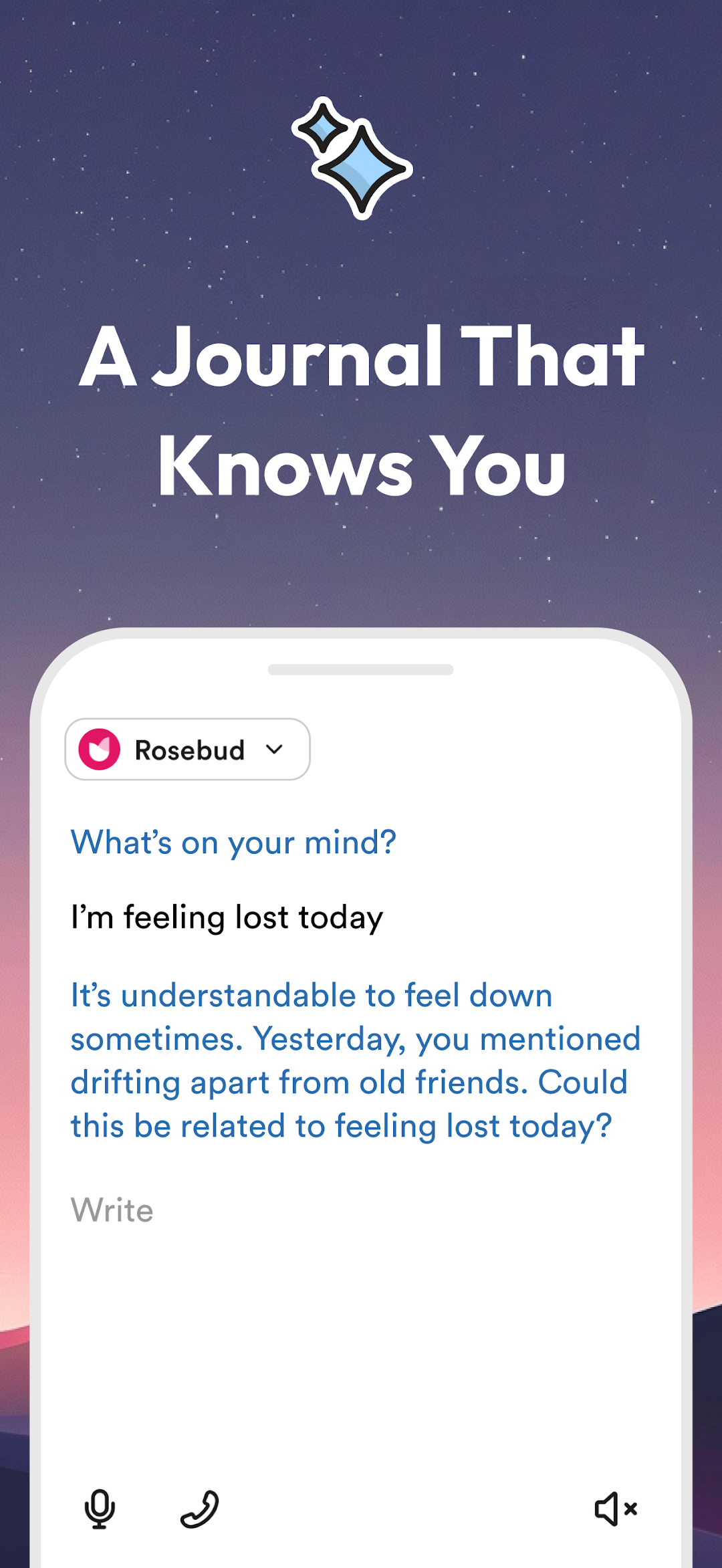
Most journaling apps give you a prompt and then step back. Rosebud stays in the conversation. Type a few lines about your day and the AI responds with a follow-up — something specific, not generic — that pushes you a step further into the thought you were circling. It is a small change in format that makes a meaningful difference to how much you actually write.
The app sits on iOS, Android, and the web, targets people who already know they want to journal but find the blank page either intimidating or too easy to abandon. Our score of 3.9 puts it level with Headway and Blinkist — solid, but with real caveats around price and scope that matter depending on what you are looking for.

What Rosebud actually is
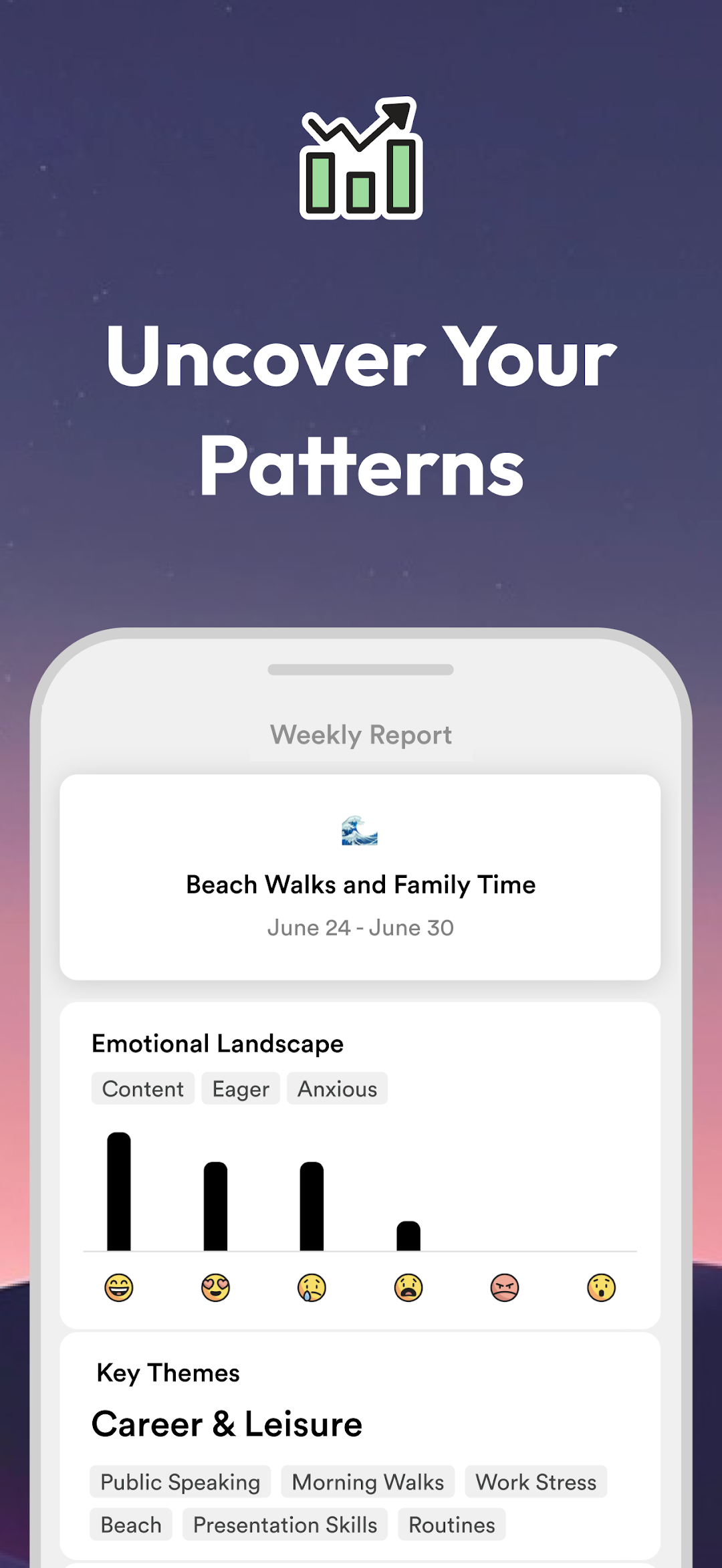
Rosebud is not a notebook with prompts bolted on. The central idea is a journaling session that resembles a lightly guided conversation: you write something, the AI reads it and asks a follow-up, you respond, and so on until the session reaches a natural close. It can surface themes across past entries — recurring anxieties, patterns in how you describe work or relationships — and flag them back to you over time.
There are no meditations, no habit trackers, no courses. Rosebud does one thing and has built its product around doing it well. That focus is both its main selling point and its biggest limitation.
Who it is for
Rosebud suits people who already have some journaling habit but find it goes stale — entries that devolve into lists or stop after three lines. It is less well-suited to beginners who want a structured programme, or anyone expecting the app to cover habits, mindfulness, or broader personal development. If you are after an all-in-one tool, look elsewhere.
Setup and first session
Onboarding is brief. You pick a few focus areas — stress, relationships, goals — and the app calibrates early prompts around them. Our time-to-first-value score is 4 out of 5; most people reach something genuinely useful within the first sitting. The web version works well for keyboard writers, though offline mode is partial, so do not count on it for plane journaling.
The AI conversation in practice
The follow-up questions are where Rosebud earns its 4.4 personalisation subscore — the highest among the AI journaling apps we reviewed. Rather than rotating generic prompts ('What are you grateful for?'), the AI reads what you actually wrote and responds to it. Write about a difficult meeting and it might ask what you were hoping the other person would understand. That specificity keeps sessions from feeling formulaic.
The pattern-recognition layer takes a few weeks to populate. Once it does, the app can note that you have mentioned a particular stressor several times or that your entries lengthen on certain days. For many users this is the most compelling feature; for others it is a reason to pause before subscribing.
The AI is not a therapist and is not positioned as one. Rosebud does include crisis resources for moments when a session surfaces something more serious, which is the right call for any app in this space.
Day-to-day feel after the first fortnight
Our stickiness score for Rosebud is 3 out of 5. The first week feels genuinely engaging — the AI novelty is real. By week two, some of that novelty fades and you are left with a journaling habit that either has enough pull on its own or does not. The app lacks the gamification of Finch or the broader content library of Liven to carry you through the dips. Reminders and a home-screen widget help at the margins, but if your motivation needs structural scaffolding, Rosebud's narrow scope starts to show.
Method and credibility
Rosebud's evidence subscore is 3.6 — mid-range. The conversational questioning borrows from CBT-style techniques without being a CBT programme. That is a fair description of most AI journaling tools: the underlying practice of expressive writing has decent research backing; the specific app implementation does not have independent clinical validation. Compared to Wysa, which explicitly cites CBT and DBT and has been studied in clinical contexts, Rosebud's evidence base is thinner. It does not pretend otherwise, which is at least honest.
Pricing and what you actually get
Rosebud's Premium plan runs around $12.99 a month at the time of writing, with a cheaper yearly option — always confirm current pricing in the App Store, Google Play, or on Rosebud's website before committing. The app offers a free trial. Unlimited AI journaling, full entry history, and insights are behind the subscription; the no-cost tier limits entries significantly.
The value subscore is 3.5, the lowest of any of Rosebud's subscores. At around $12.99 a month for a single-purpose journaling app, it costs roughly as much as Headspace, which covers meditation, sleep, and structured courses. That is a tough comparison to ignore. If you journal every day and the AI conversation genuinely changes the quality of your reflection, the maths can work — but it is a real premium for a narrow remit.
How Rosebud compares to Reflectly and Day One
Reflectly is Rosebud's closest direct rival. Both use AI to guide journaling; Reflectly leans more on mood logging and a structured daily format, while Rosebud leans more on open-ended conversation. Rosebud's personalisation is stronger; Reflectly is cheaper at around $59.99 per year as of writing. If you want more structure, Reflectly is worth considering.
Day One is a different animal — a private journal with excellent design and export options, but no AI companion at all. If you want complete ownership of a plain writing experience, Day One wins. If the AI follow-up is what appeals, Day One will not scratch that itch.
How Rosebud compares to Liven
Liven is our top-ranked app and covers mood, journaling, habits, courses, AI companion, and meditations in one place. Where Rosebud beats Liven is in the quality of the journaling conversation specifically — Rosebud's AI-led dialogue is more focused and more responsive to what you actually write. Liven's AI companion (Livie) is broader in scope but less journaling-specific.
Liven carries its own downsides — upsell-heavy onboarding and a subscription that can cost more depending on the plan. If journaling is your sole focus, Rosebud is the sharper tool. If you want everything under one roof, Liven's range wins.
Privacy considerations
Journaling through an AI means your entries are processed by external systems. Before you start writing about anything sensitive, read the current privacy policy — check data retention, third-party sharing, and whether your entries are used to improve the model. The policy can change, so verify it at the point you sign up. On the upside, Rosebud supports data export, so you are not locked in.
Store ratings and our score
App Store ratings sit at around 4.7 and Google Play at around 4.3 as of June 2026 — solid, though the Play Store gap is wider than usual and worth watching. Our overall score is 3.9. The highest subscore is personalisation (4.4); the lowest is value (3.5), which tracks with user reviews: people like the experience but balk at the price. It is the best dedicated AI journaling tool we reviewed — the question is whether that is what you need.
Maker: Rosebud · Platforms: iOS, Android, Web · Approach: Self-guided, AI-led · Methods: journaling, reflection, CBT-style prompts
Rosebud plans & pricing
Free tier: Limited free entries; subscription for full use.
Trial: Free trial offered.
Prices approximate, as of June 2026 — verify on the App Store / Google Play. Unlimited AI journaling, insights and history need a subscription.
Cancellation: Cancel through your app-store or web subscription.
Feature checklist
- Mood trackingLight
- JournalingYes
- AI companionYes
- Courses & lessons—
- Meditations—
- Soundscapes / focus music—
- Habit & routine builder—
- RemindersYes
- Quiz / assessment—
- Community—
- Live coaching—
- Crisis resourcesYes
- Data exportYes
- Apple Health / Google Fit—
- Home-screen widgetsYes
- Offline usePartial
Rosebud pros & cons
What's good
- AI follow-up questions feel genuinely tailored, not template-driven
- Pattern-spotting across past entries is a real differentiator
- Available on iOS, Android, and the web — easy to journal wherever you are
- Export functionality lets you take your writing elsewhere
- Crisis resources included for moments when reflection turns heavy
- Clean, distraction-free writing interface
What to weigh up
- No habit builder, meditations, courses, or soundscapes — very narrow scope
- At around $12.99 a month (as of writing), the price is steep for a journaling-only tool — confirm current pricing in the App Store or on the web
- Stickiness score of 3 out of 5 — many users plateau after the novelty of the AI fades
- No health-sync integration
- Offline mode is only partial, which can interrupt a flow mid-session
Support
Rosebud offers in-app support and a help section; response times are not guaranteed and may vary. If you have billing questions, check your app-store or web subscription settings first.
Method & credibility
Rosebud describes its prompts as drawing on journaling and reflection practices, with some CBT-style questioning built into the AI flow. No independent clinical studies are cited on the app itself, and the approach is self-guided rather than clinically supervised.
Privacy & data
Journaling data is sensitive by nature — your entries pass through Rosebud's AI systems to generate follow-up questions. Read the current privacy policy carefully before you start, paying attention to data retention, third-party sharing, and how your entries are used to train or improve the model.
Third-party ratings
- 4.7 / 5 on App Store — as of June 2026, verify
- 4.3 / 5 on Google Play — as of June 2026, verify
We report independent ratings with their source and date and never invent them. Figures here are approximate and pending verification before launch.
Our data: Rosebud
Two numbers we measure ourselves, on the same 1–5 scale for every app — the things most roundups never score (see all 20 on the compare page):
Rosebud FAQ
Does Rosebud work without an internet connection?
Offline support is partial. You can access the app without a connection in some circumstances, but the AI features require connectivity to function. If you journal in places without reliable signal, that is worth factoring in before subscribing.
Can I export my journal entries from Rosebud?
Yes — Rosebud supports data export, so your entries are not locked into the platform. Check the current export format and options in the app settings.
Is Rosebud suitable if I have never journaled before?
It can work for beginners — the AI prompts lower the barrier of the blank page. That said, a simpler and cheaper starting point like Daylio's micro-journal format might build the habit first before you invest in a premium AI tool.
How does the AI pattern recognition work?
The app analyses past entries to identify recurring themes or emotions and surfaces them back to you. The longer you use it, the more useful that layer becomes. How your entries are processed is covered in the privacy policy.
Is Rosebud a replacement for therapy?
No. Rosebud is a self-guided journaling tool and is not a substitute for professional mental health support. It includes crisis resources for moments when a session raises something serious, but the app itself is not clinical care.
How do I cancel my Rosebud subscription?
Cancel through your App Store or Google Play subscription settings, or through Rosebud's web account if you subscribed there. Cancel before your renewal date to avoid being charged for the next billing period.